With the end of maintenance for SAP Process Integration & Orchestration (SAP PI/PO) on December 31, 2027, many companies are now facing the challenge of migrating their integration scenarios to a new integration platform. Although SAP offers a paid support extension until 2030, this represents only a temporary transitional solution. Instead of making another “coin insertion” at SAP, it is worth looking ahead early—toward the direct successor: the SAP Integration Suite.
In this blog post, we highlight the benefits of the SAP Integration Suite and present our approach for migrating from the old world (PI/PO) to the new world (Integration Suite).
Integration solutions – a brief overview
Many companies have already mastered the transition from SAP Exchange Infrastructure (SAP XI) to PI/PO and are now facing the next stage of modernization. The SAP Integration Suite is one of the core components of the SAP Business Technology Platform (SAP BTP). It provides companies with a modern, cloud-based way to design their integration scenarios efficiently—from modeling and development to monitoring.
Organizations with strict compliance requirements or a need for full data control can rely on the SAP Edge Integration Cell—an on-premises solution in which all data remains within the company’s own infrastructure, while development and administration are conveniently handled in the cloud.
Why switch to the SAP Integration Suite?
Time is running out: all integration scenarios should be migrated by the end of 2027. Those who do not act by then will have to choose between costly extended support or the risk of operating on a platform that is no longer maintained. However, migration is more than just a technical necessity – it is an opportunity to modernize your entire integration landscape.
The benefits of the SAP Integration Suite at a glance:
- Cloud-native architecture: Updates are applied automatically without downtime, capacity scales flexibly with demand, and operating costs are significantly reduced since no infrastructure needs to be managed.
- Modern integration patterns: Standardized APIs, event-driven workflows, and microservices enable rapid system extensions and keep your IT landscape agile and decoupled.
- Extended capabilities: A single platform for API Management, Open Connectors, Integration Advisor, and more—no more separate tools and complex system interconnections.
- Future-proofing: Continuous innovation and integration of new SAP solutions (S/4HANA, SAP BTP services) ensure you always stay up to date.
- Improved developer experience: Intuitive graphical tools, extensive pre-built content, and modern development workflows accelerate development cycles while lowering the entry barrier for new developers.
Preparation: Where do you stand today ?
Over the years, a wide range of interfaces accumulates in every company—often highly customized, with specific mappings and deeply nested business logic. Depending on the scope and complexity of this integration landscape, the transition can be a manageable or a very extensive project. The key question is: which integration scenarios do you have, and are they ready for migration?
The migration assessment – transparency as the foundation
This is where the Migration Assessment Tool of the SAP Integration Suite comes into play. The tool automatically analyzes your existing PI/PO landscape and provides a detailed assessment of each individual integration scenario.
How the assessment works:
The tool extracts data directly from the Enterprise Services Repository (ESR) and the Integration Directory of your SAP Process Orchestration environment. A rule-based evaluation then classifies each scenario into one of three categories:
1. Ready to migrate (green)
- Scenarios can be migrated manually or semi-automatically to the Integration Suite
- Minor configuration adjustments may be required
- Standard adapters and functions are used
2. Adjustment required (yellow)
- Migration is generally possible, but adjustments are necessary
- Example: file adapters must be converted to SFTP
- Best practices must be applied
3. Evaluation required (red)
- No direct match identified
- Custom adapter modules or special functions in use
- Detailed individual assessment required
What the assessment delivers:
The assessment tool provides an interactive dashboard with a visual representation of your integration landscape. The effort estimation indicates the migration effort using “T-shirt sizes” (S, M, L, XL), while a detailed adapter analysis shows which sender and receiver systems are affected. All results can be exported as PDF or Excel files—giving you full transparency regarding expected migration effort already during the planning phase.
Moving to the SAP Integration Suite requires experience
Whether you are a mid-sized company with 50 integration scenarios or a corporation with several hundred complex flows – we operate in both environments and know the respective challenges first-hand. Thanks to this practical experience, we can quickly ramp up and deliver value from day one. You benefit from a single point of contact – from the initial analysis through development to go-live and beyond.
As a long-standing SAP partner, we also have extensive experience and deep expertise across all SAP integration technologies, including:
- SAP Process Orchestration (SAP PO incl. SAP BPM and SAP BRM)
- SAP BTP Integration Suite (Cloud Integration, API Management, Integration Advisor, Open Connectors)
- Hybrid integration scenarios involving a wide variety of systems
From SAP PI/PO to the SAP Integration Suite – no project without a concept
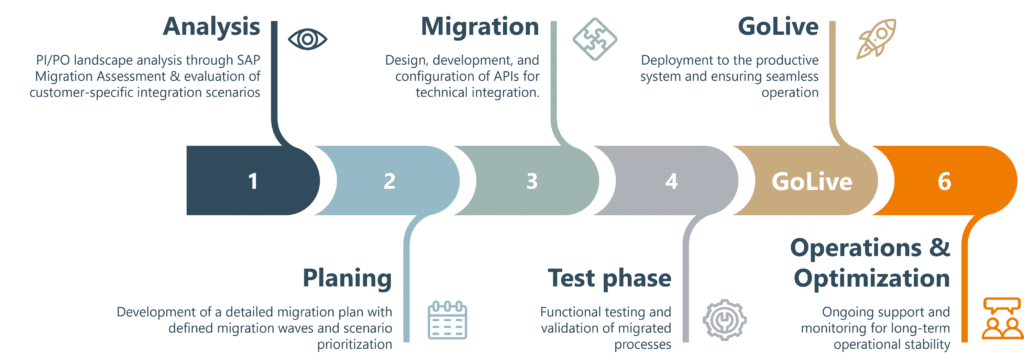
Graphic: QUANTO Solutions
A migration from SAP PI/PO to the Integration Suite is not a project you “just do on the side.” It requires a well-thought-out concept, clear responsibilities, and defined processes. Our six-phase model has proven itself in numerous projects and provides exactly this structure.
The migration process comprises six phases:
First, an analysis is carried out using the SAP Migration Assessment Tool to evaluate the PI/PO landscape and identify requirements. The result is a report containing a scenario overview, risk analysis, and effort estimation. This is followed by the planning phase, in which a structured roadmap with prioritized waves, milestones, and resource requirements is created.
During the migration phase, the integration scenarios are implemented iteratively: iFlows are developed, tested, and documented in Cloud Integration. This is followed by comprehensive testing—from functional tests to user acceptance testing—whose results form the basis for the go/no-go decision for go-live. The go-live phase includes productive deployment according to the cutover plan, final tests, and a hypercare phase with parallel operation and monitoring. Finally, the solution is handed over to regular operations, accompanied by further optimizations and employee training.
A structured approach is critical
Experience shows that once a project reaches a certain level of maturity, specific tasks become time-critical and must be executed quickly. Classic examples include test data provisioning or coordination with business departments for user acceptance testing. These aspects are often neglected or underestimated for too long—and then lead to significant project delays.
Through our structured approach with defined milestones and clear responsibilities, we identify such critical points early and address them in good time. Regular wave reviews and active risk management ensure that nothing is overlooked and that the project stays on track.
The combination of regular status meetings and tracking via Jira/Azure DevOps provides a clear governance framework with transparency and fast decision-making.