


Part 1: Flexible Workflow as a strategic topic
In many companies, approval processes in procurement or sales act like small gears—often overlooked, yet crucial for the smooth functioning of the overall machine. Whether it is a sales order, purchase order, or supplier invoice, approvals determine speed, commitment, and ultimately economic success. Yet these processes are often unnecessarily rigid, non-transparent, and difficult to adapt. The classic SAP standard workflow is technically complex, inflexible, and—above all—not intuitive for business users.
This is where the Flexible Workflow in SAP S/4HANA comes into play-a tool that streamlines processes, relieves users, and creates transparency. It is not merely a technical innovation, but a strategic lever for greater organizational agility. What makes it special is that it returns process control to the business departments without compromising IT governance. Configuration is possible without programming knowledge – fully aligned with modern IT architectures.
Approvals slow down material flow
In day-to-day logistics operations, every minute counts: purchase orders must be released, sales orders approved, and delivery dates met. Yet in many companies, approval processes are rigidly tied to central organizational structures—often derived from HR organizational models (PPOME).
What this means in practice:
- A purchase order for urgently needed spare parts gets stuck because the responsible manager is on vacation.
- New warehouse processes require temporary project teams to approve documents -but SAP does not recognize these teams structurally.
- Short-term changes to approval rules require IT involvement.
In the classic workflow:
- Responsibilities are hard-coded in the system—via user roles, positions, or organizational structures.
- Temporary teams or context-based logic (e.g., thresholds by value or material group) are difficult to implement without technical changes.
- Flexibility is limited; changes are time-consuming and error-prone.
The solution with Flexible Workflow:
Using the Fiori app “Teams and Responsibilities (F2412)”, approval teams can be flexibly maintained and assigned—independent of organizational hierarchies. Assignments can be rule-based, for example depending on order value or project type.
Small changes become IT projects
Logistics requirements change rapidly – due to supply shortages, seasonal fluctuations, or revised budget thresholds.
Classic SAP workflows are cumbersome: changes require technical adjustments, transports, testing – and scarce IT capacity.
Typical scenarios:
- Temporarily lowering the investment approval threshold to €30,000
- Automatically assigning substitutes if an approver does not respond within 48 hours
- Applying special rules for strategically important suppliers
In the classic workflow:
- Changes require adjustments in workflow customizing, events, or container logic.
- Technical expertise, transport requests, and testing are required.
- Business departments cannot make changes themselves—every change becomes a mini IT project.
The solution with Flexible Workflow:
Approval rules, thresholds, and approvers are maintained directly in the Fiori app “Manage Workflows”, without ABAP development or transports. Changes take effect immediately and can be handled by key users.
Lack of process transparency
A frequent source of frustration in logistics: a delivery is delayed, but no one knows where the approval process is stuck. Procurement asks the warehouse, the warehouse asks management. Emails, screenshots, and phone calls follow—resulting in a confusing web of communication and unclear responsibilities.
In the classic workflow:
- Workflow status is only visible via technical transactions or logs (e.g., SWIA, SWI1), usually accessible only to IT.
- No unified monitoring for business users.
- Manual investigation is required to determine status.
The solution with Flexible Workflow:
- The “My Inbox (F0862)” app provides all participants with immediate access to their tasks.
- Status indicators and histories are visible in the Fiori Launchpad—even for non-IT users.
- Transparency increases, along with ownership and accountability.
Mobile processing is the exception rather than the rule
Many decision-makers in logistics work on the move—on the shop floor, in warehouses, with suppliers, or while traveling.
Classic SAP GUI is not mobile-capable; approvals are tied to desktops.
In the classic workflow:
- Access only via SAP GUI (e.g., transaction SBWP).
- No mobile support, no push notifications, no web access.
- Folge: Entscheidungen verzögern sich – oft über Tage.
The solution with Flexible Workflow:
With the “My Inbox” Fiori app, tasks can be processed anytime, anywhere—on tablets, smartphones, or browsers. Push notifications, reminders, and email alerts ensure faster responses and improved on-time delivery performance.
Summary comparison:
| Everyday challenge | Classic Workflow | Flexible Workflow |
| Temporary project teams as approvers | Only via SAP structure changes | Via “Teams & Responsibilities” app |
| Adjust thresholds or special rules | Customizing & IT project | Directly via Fiori by business users |
| Check order status | IT-only access (SWIA etc.) | Visible in Launchpad |
| Mobile approvals | Not possible | Yes, via Inbox app |
Part 2: Flexible Workflow – How to implement it successfully
1. Preparation and analysis
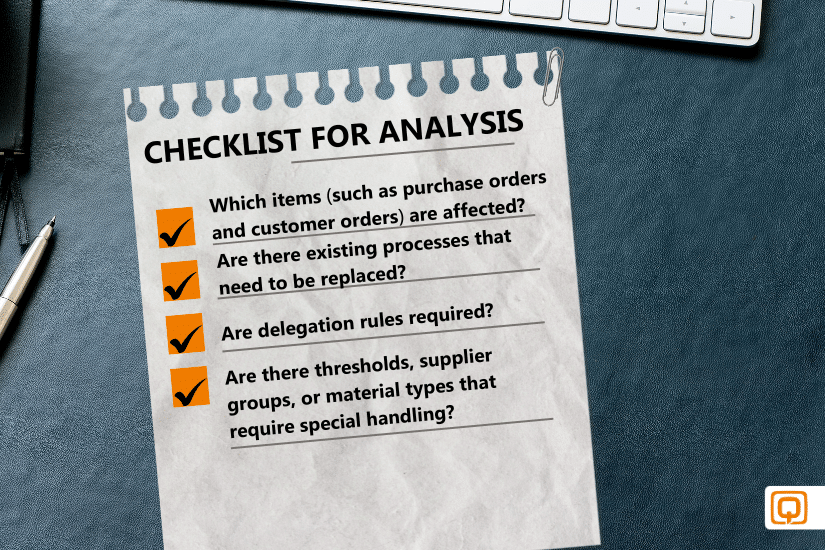
Implementation begins with a structured analysis: Which document types require approval? How many approval levels are appropriate? Are there special cases or industry-specific requirements (e.g., capital expenditure approvals in logistics)? Who should make decisions – and how dynamic are these structures?
These questions should be clarified in close collaboration with business departments before technical configuration begins.
2. Establish technical prerequisites
To use Flexible Workflow productively in SAP S/4HANA, certain technical prerequisites must be met. At minimum, SAP S/4HANA release 1809 FPS01 is required; version 1909 or higher is recommended due to more stable and comprehensive Fiori integration.
An active Fiori Launchpad with relevant tiles – especially “Manage Workflows” and “My Inbox” – is also required.
In addition, the corresponding workflow scenarios must be activated. These scenarios form the technical basis for all flexible workflows and must be activated per client.
Example: Purchase order approval
The technical scenario WS00800238 must be activated via:
SPRO → SAP NetWeaver → Business Workflow → Flexible Workflow → Scenario Activation
or transaction SWF_CRACT
Important:
Without scenario activation, workflows technically exist but are not visible or configurable in the “Manage Workflows” app.
3. User maintenance & business partner integration
All workflow participants must exist as Business Partners in SAP S/4HANA. This is mandatory to ensure consistent identification.
Steps:
- Create user via transaction SU01
- Assign BP role Employee (BUP003)
- Run synchronization report /SHCM/RH_SYNC_BUPA_FROM_EMPL
Practical tip:
If a user does not appear in workflow assignment lists, it is almost always due to a missing BP linkage.
Practical tip:
If a user does not appear in workflow assignment lists, it is almost always due to a missing BP linkage.
4. Roles & authorizations
Precise role and authorization assignment is essential for business users to configure workflows or approve documents.
Typical roles include:
- SAP_BR_MANAGER – approvals
- SAP_BR_PURCHASER, SAP_BR_SALES_REP – object-specific processes
- SAP_BR_WORKFLOW_CONFIGURATOR – workflow configuration
Required authorization objects include S_SERVICE, S_WF_WI, S_USER_GRP, and S_RFC.
Access to apps such as “Manage Workflows,” “My Inbox,” and “Teams and Responsibilities” is controlled exclusively via the Fiori Launchpad.
5. Fiori setup and OData services
| App | OData-Service |
| My Inbox | /IWPGW/TASKPROCESSING |
| Manage Workflows PO | WORKFLOWTASK, WSRUNTIME |
| Teams and Responsibilities | WORKFLOW_TEAM_SRV |
6. Consulting & change enablement
In system landscapes with existing classic workflows or multiple locations, engaging experienced consultants is highly recommended. They support scenario selection, technical activation, configuration, training, and user adoption.
Part 3: Conclusion
Advantages over the classic workflow and limitations
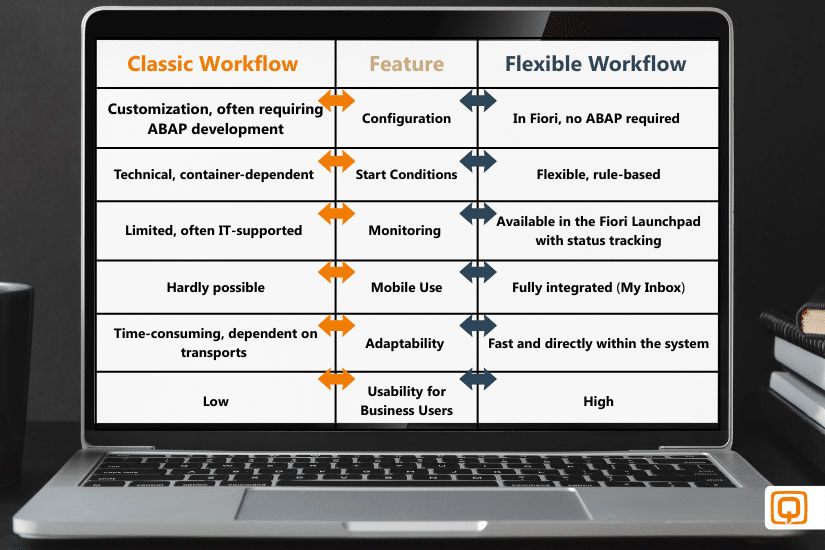
Despite its advantages, some limitations remain::
- No full ad-hoc approvals during runtime
- Complex exception handling (escalations, conditions) still requires BAdIs
- Not usable without Fiori – classic GUI is not supported
- Parallel use with classic workflows requires careful coordination
Introduce the Flexible Workflow gradually and consolidate classic workflows once it is established.
Flexible Workflow as a key to digital maturity
The Flexible Workflow in SAP S/4HANA is more than a new tool—it is a catalyst for modern digital process design in procurement and sales. It enables companies to control approval processes quickly, transparently, and user-friendly—without constant IT intervention or lengthy transports. Organizations aiming to future-proof their approval processes should view the Flexible Workflow as an integral part of their IT strategy.